1. Place your QR code
Generate the code from your business dashboard, download a print-ready PDF or PNG, then print and display it where guests can scan it.
Give guests a quick way to open your restaurant’s branded menu from a QR code on a table, takeaway bag or receipt. They can browse on their phone and order directly through your site, with collection or delivery options set by your business.
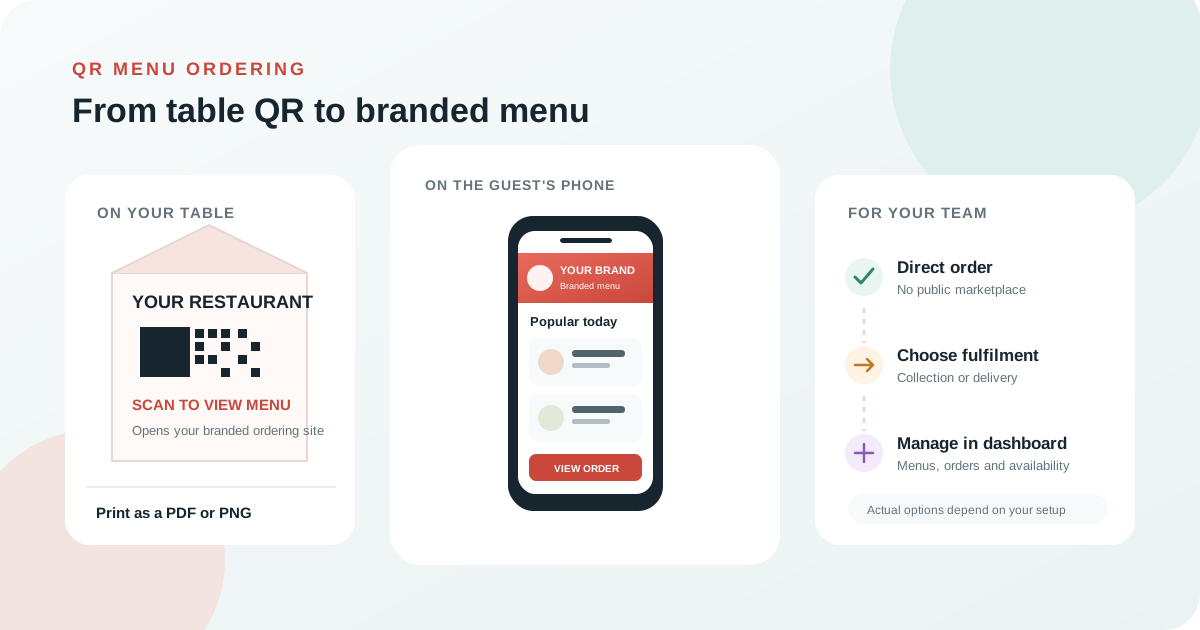
Guests can open your direct online menu from their own phone instead of searching for a paper menu or a public restaurant listing. Your restaurant’s name, menu and ordering experience stay together on your branded site. A QR code is a simple link to that site, so you can also use it on packaging, flyers and receipts.
Generate the code from your business dashboard, download a print-ready PDF or PNG, then print and display it where guests can scan it.
The QR link opens your restaurant’s branded ordering site in a phone browser. Guests can view menu items and available options without installing an app.
Guests can place an online order through checkout. You manage the menu and incoming orders in your dashboard and fulfil orders using the enabled service options.
Keep the QR experience practical: a clear path to your menu, current availability and the order options you have configured.
QR scans take guests to your white-label restaurant site, with your menu and restaurant identity in front.
Maintain items, sizes and add-ons from your dashboard, and adjust what is available as your menu changes.
Guests place direct online orders through checkout. Payments are handled by the configured provider; PicMeals does not store card details.
QR ordering leads into the same branded ordering site. Offer collection or, where configured, delivery by your own drivers or a PicMeals driver network.
See incoming orders and manage menus, opening status and fulfilment settings from your business dashboard.
Download your QR code as a PDF or PNG. Test it with a phone before printing and place it somewhere well lit and easy to scan.
There is no special QR hardware to install. Your team needs a PicMeals business account, a published menu and a way to print and display the code.
Register as a business, add your restaurant information and set up its branded web address. New business accounts are reviewed before going live.
Enter menu items, prices and any available sizes or add-ons. Configure opening status and the collection or delivery options your restaurant offers.
Open QR Code Menu in the dashboard, download the PDF or PNG and scan it yourself before placing copies on tables or printed materials.
For QR setup steps, visit Help & Docs or sign in to manage your QR code.
Your QR code links to your normal PicMeals ordering site. The payment model and fulfilment options depend on the plan and business settings you select.
No monthly fee. PicMeals takes the customer’s payment, retains a fee per order and pays your business weekly. Delivery can use your own drivers or PicMeals drivers, as configured.
No commission on your direct orders and a 60-day free trial. Customers pay your own Stripe account. This option currently supports euro-priced orders for collection or delivery with your own drivers.
Compare our flat monthly, no-commission direct-payment plan with pay-per-order. Plan eligibility depends on business currency and fulfilment setup. See the FAQs.
How the QR link works, what guests can order and what you manage in PicMeals.
Your dashboard generates a QR code that links to your branded ordering site. Guests scan it, browse your menu on their phone and can place an online order using the checkout. Orders use the collection or delivery options configured for your business.
No app download is needed to open the QR link. It opens your restaurant’s ordering site in the guest’s phone browser.
The current QR code links to your restaurant’s branded ordering site and does not pass a table number with the order. Online orders use the collection or delivery flow configured for your business.
Yes. Guests can use the same branded site to place collection or delivery orders, depending on the options you have enabled. Delivery can use your own drivers or the PicMeals driver network where configured.
Choose pay-per-order with no monthly fee, or a flat monthly plan with no commission on your orders. The no-commission direct-payment option currently supports euro-priced businesses using their own Stripe account, for collection or delivery with their own drivers. Contact PicMeals for current plan details.
You can manage menu items, availability and opening status from your business dashboard.
Book a demo to see how PicMeals QR codes connect to your direct ordering site.